Flipkart seller guide
Flipkart Payment Not Received for a Delivered Order: What to Check
Quick answerBefore you chase a missing Flipkart payment, check four things: whether the order is really delivered, how long ago, whether its Order item ID is in a settlement report (without the OI: prefix), and whether it was returned. In our September to October settlements, half of all sales were paid within 10 days of dispatch, 9 in 10 within 12 days and the slowest after 21 days. An order older than that with no settlement row is worth a ticket to Flipkart Seller Support.
On this page · 6 sections
How long Flipkart took to pay us
We compared the Dispatch Date and the Payment Date of 1,186 sale rows in one month of our settlement report. Half were paid within 10 days of dispatch, 90% within 12 days, and the slowest took 21 days. Payouts landed on Mondays, Wednesdays and Fridays.
Your timing can differ, for example around holidays, so use your own report as the yardstick. The Payments section of Seller Hub also shows payments that are due.
Check these four things in order
Is it delivered? In the Orders report, order_item_status should be DELIVERED and order_delivery_date should be filled. An order in transit or with RETURN_REQUESTED is not paid as a sale yet.
How long ago? Count from dispatch. If it is within the time your other orders usually take, wait for the next payout day.
Is it already paid? Search the Order item ID in your settlement reports. The Orders report writes it as OI:338…, while the settlement has only the number, so search without OI:. Look in reports for later payment dates too.
Was it returned? A row with Refund and Return Type means the payment was reversed. A Logistics Return (RTO) cancels the sale, and a Customer Return also takes the reverse shipping fee.
When the order is in the settlement but you still feel short
- The order item has more than one row. Add all rows for the Order item ID before deciding it was underpaid; see why one order has several rows.
- The payout was lower because of a fine or ads wallet top-up with the same NEFT ID. Match the payout to your bank with every sheet included.
- Fees and taxes were taken. Bank Settlement Value is after marketplace fees, TCS and TDS; the TCS and TDS come back as tax credits.
When to raise a ticket
Raise it with Flipkart Seller Support in Seller Hub when the order is delivered, well past the time your other orders took to be paid, and its Order item ID is in no settlement report. Give the Order ID, Order item ID, delivery date and the settlement periods you checked. Keep the ticket number with the order.
See every unpaid delivered order at once
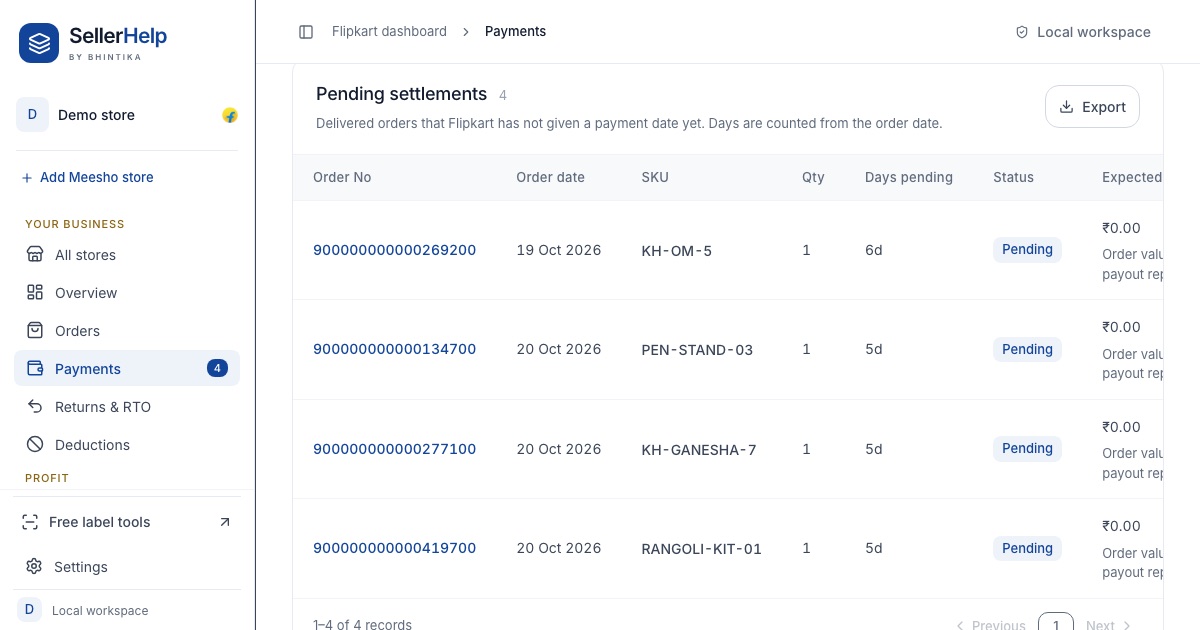
Checking orders one by one takes long when you have hundreds. The free Flipkart seller dashboard matches your Orders report with your settlement reports. The Payments tab lists delivered orders that have no payment yet, with the number of days since the order, so you can see which ones are late and which are only waiting for the next payout.
Frequently asked questions
How many days does Flipkart take to pay sellers?
In our settlements for September to October 2026, half of all sales were paid within 10 days of dispatch and 9 in 10 within 12 days. Check your own Dispatch Date and Payment Date columns, because it can vary.
Why can I not find my order in the settlement report?
Search the Order item ID without the OI: prefix, and look in reports for later payment dates. An order that is not yet delivered or was returned may not have a sale row.
The order was RTO. Will I be paid?
No sale is paid for an RTO. In our files the sale and refund rows cancelled to zero and there was no reverse shipping fee.
Can I see pending Flipkart payments in Seller Hub?
Yes, Seller Hub shows upcoming and past payments under Payments. The settlement report only lists money already settled.