Flipkart seller guide
Match Your Flipkart Settlement to the Bank: NEFT ID and Net Bank Settlement
Quick answerEach Flipkart payout has a NEFT ID. To reconcile, add the Bank Settlement Value of every row with the same NEFT ID in the settlement report, across the Orders, Fines and other sheets, and compare the total with the credit in your bank statement on the Payment Date. In our month Flipkart paid on Mondays, Wednesdays and Fridays, usually as two credits on the same day: one Prepaid and one Postpaid. The sum of all payouts equals Net Bank Settlement (A) in the Summary sheet.
On this page · 6 sections
One NEFT ID is one bank credit
Every row in the settlement report starts with Payment Details: NEFT ID, Neft Type, Payment Date and Bank Settlement Value. The NEFT ID names the payout the row belongs to. All rows with the same NEFT ID were paid to you together, as one credit.
Neft Type is Prepaid or Postpaid, for orders the customer paid online or on delivery. In our September to October settlement, 21 NEFT IDs were spread over 11 payment dates. Most dates had two credits, one Prepaid and one Postpaid, so expect two entries from Flipkart on the same day in your bank statement.
Steps to reconcile one payout
Download the settlement report for the payment dates you want to check, from Seller Hub, Payments, Settlements.
In the Orders sheet, make a PivotTable with NEFT ID in Rows and Bank Settlement Value in Values as a Sum. Add Payment Date to Rows too, so you see the date of each payout.
Check the Fines, Ads and other sheets for rows with the same NEFT ID. A fine taken from a payout carries that payout's NEFT ID, and it lowers the credit.
Add the sheets together for each NEFT ID. That total is what should have reached your bank.
Find the credit in your bank statement on the Payment Date (or the next working day) with the same amount. Tick it off and move to the next NEFT ID.
Check the whole period against the Summary
Add up all payouts in the period. The total should equal Net Bank Settlement (A), the last block of the Summary of report sheet. In our month the Orders sheet total plus the fines was exactly the Net Bank Settlement, so nothing was left over.
If the period does not match, look for a sheet you skipped. Fines, ads wallet top-ups, storage and service fees, SPF and TDS claims each sit on their own sheet with their own NEFT ID.
When a payout does not match the bank
- Credit missing on the date: look at the next working day too, and at bank holidays. In our file there was no payout between 28 September and 5 October.
- Amount is lower: a fine or an ads wallet top-up on another sheet shares the NEFT ID. Add those rows.
- Amount is negative: if returns and fines in a payout are more than its sales, the NEFT ID can total below zero. Look for customer returns with a reverse shipping fee in that payout.
- Two smaller credits instead of one: check whether you added the Prepaid and Postpaid NEFT IDs together. They are separate credits.
Let the dashboard list payouts by date
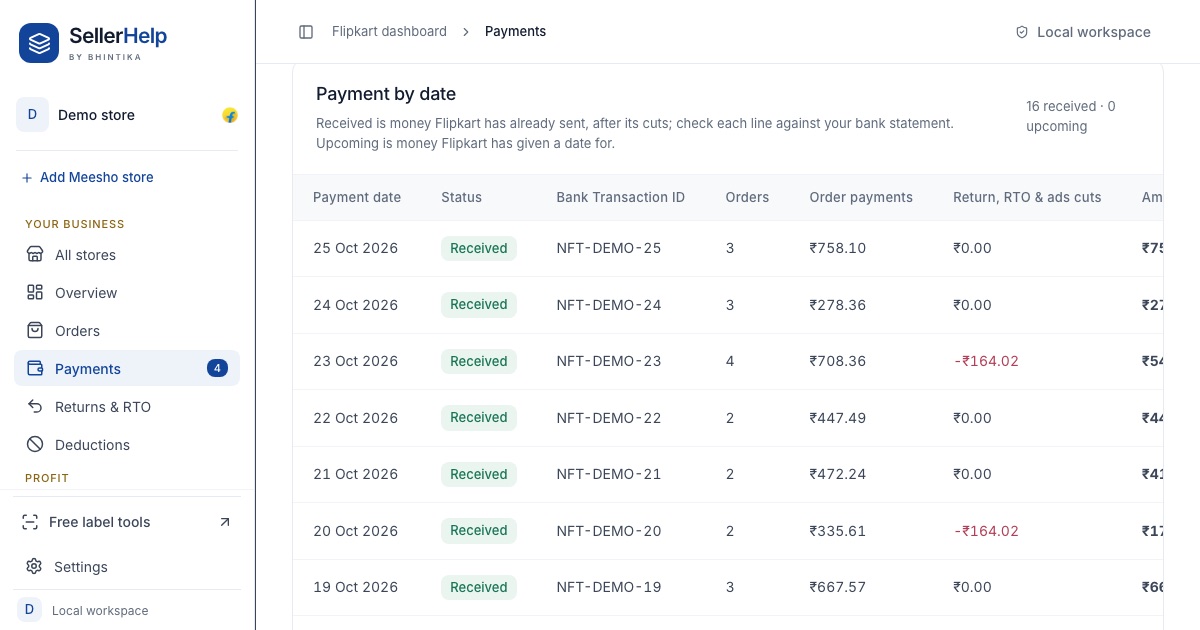
The free Flipkart seller dashboard groups the settlement report by payout. The Payment by date table on the Payments tab shows each date with its bank transaction ID, the number of orders, the order payments and the return, RTO and ads cuts, so you can tick each line against your bank statement. If you want to read the report by hand first, start with how to read the Flipkart settlement report.
Frequently asked questions
What is the NEFT ID in the Flipkart settlement report?
It is the ID of the payout a row belongs to. All rows with the same NEFT ID were paid together as one bank credit.
Why did Flipkart pay me twice on the same day?
Prepaid and Postpaid orders are paid as separate NEFT IDs. In our month most payment dates had one of each.
On which days does Flipkart pay sellers?
In our settlement for September to October 2026, every payout was on a Monday, Wednesday or Friday. Check the Payment Date column in your own report, because schedules can change.
Why is Net Bank Settlement lower than the Orders total?
Fines, ads wallet top-ups and service or storage fees are taken after the Orders line. Each has its own line in the Summary sheet.