Flipkart seller guide
How to Cut Returns and RTO on Flipkart Using Your Returns Report
Quick answerStart with the returns report from Seller Hub (Returns, then Reports). Count returns per SKU and read the return_sub_reason column, because each reason points to a different fix. In 133 of our returns, the top customer reasons were quality not as expected (19), different product received (10) and damaged product received (7), which point to the listing, picking and packing. Courier returns (RTO) were led by delivery attempts and cancellations after dispatch. Fix the SKU with the most returns first, then measure again on the next report.
On this page · 6 sections
Download the returns report and find the columns
In Flipkart Seller Hub, open Returns, then Reports, and download the returns report for a month. The columns that matter here are sku, return_type (courier_return or customer_return), return_reason, return_sub_reason and return_requested_date. The file opens with a Help sheet that explains every column.
If the Returns sheet opens empty or shows only the header, the rows are still there; here is the fix.
What 133 of our returns said
51 of the 133 were customer returns and 82 were courier returns. The return_reason column groups them more broadly; for example 14 had the reason MISSHIPMENT.
| Reason (return_sub_reason) | Type | Count | What it points to |
|---|---|---|---|
| QUALITY_NOT_AS_EXPECTED | Customer | 19 | Photos or description promise more than the product |
| DIFFERENT_PRODUCT_RECEIVED | Customer | 10 | Wrong item picked or packed |
| DAMAGED_PRODUCT_RECEIVED | Customer | 7 | Packing |
| CUSTOMER_DOES_NOT_WANT | Customer | 6 | Change of mind; hard to prevent |
| DIFFERENT_SPECIFICATIONS_FROM_WEBSITE | Customer | 3 | Size or details in the listing |
| MISSING_ACCESSORY | Customer | 2 | Packing checklist |
| ORC_validated with customer | RTO | 29 | Order cancelled after dispatch |
| Attempts_Exhausted | RTO | 16 | Courier could not deliver |
Fixes by reason
- Quality not as expected: shoot photos of the real product in daylight, show its size next to a common object, and state the material and thickness. Do not use photos that look better than the item.
- Different product received: pick and pack one SKU at a time. Printing labels sorted by SKU helps; the free Flipkart label crop tool can sort them before you print.
- Damaged product received: add corner protection or a stiffer box for breakable items, and do a drop test with one packed parcel.
- Different specifications from website: compare the listing's size, colour and quantity with what you ship, and fix the listing first.
- RTO from cancellations and failed attempts: dispatch on time, because a late parcel gives the customer more time to cancel. Our Orders report flags late dispatches in the dispatch_sla_breached column: 15 of 1,611 orders that month.
Find the SKUs that come back
In the returns report, make a PivotTable with sku in Rows, return_type in Columns and a count of return_id.
Count orders per SKU from the Orders report for the same dates.
Divide: customer returns ÷ delivered orders, and RTO ÷ dispatched orders, per SKU.
Sort by the number of returns and by the rate. A SKU with many orders and a high rate costs the most.
Track it per SKU every month
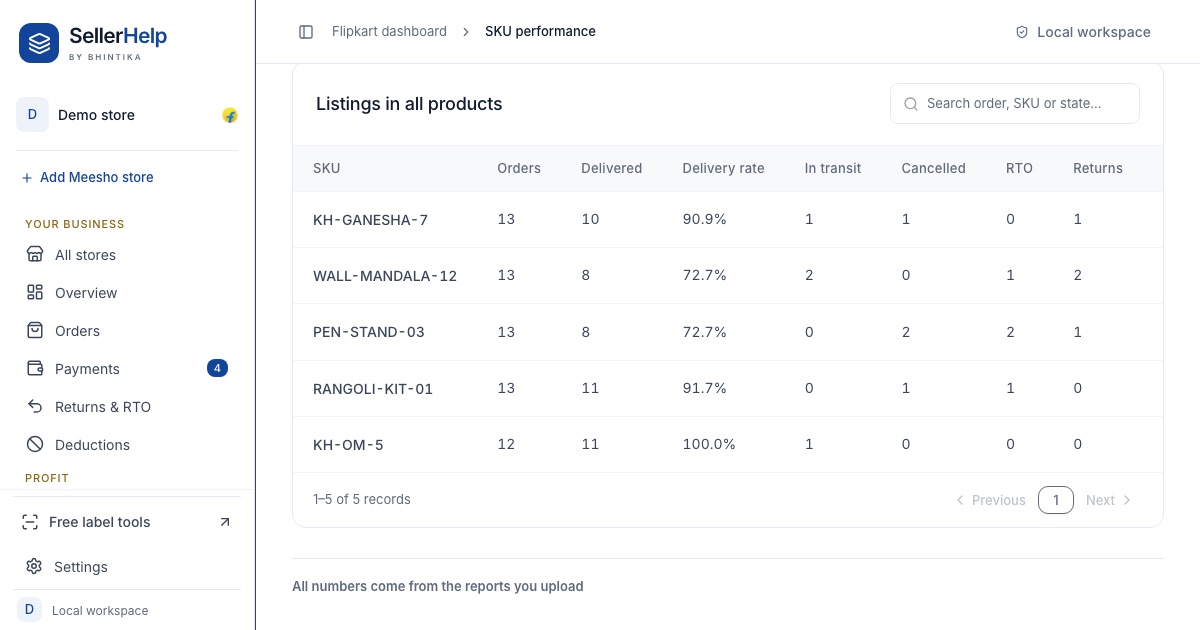
The free Flipkart seller dashboard does the counting for you. The SKU performance tab shows orders, delivered, delivery rate, RTO and returns per listing, and the Returns & RTO tab shows the charges per SKU and the reasons. Upload the next month's reports and compare.
Frequently asked questions
Where do I find return reasons on Flipkart?
In the returns report from Seller Hub, Returns, Reports. The return_reason and return_sub_reason columns hold the reason the customer or courier gave.
Can I stop customers returning products?
Not entirely. Change of mind will always happen. Reasons like wrong product, damage and quality not as expected can be cut with better listings, picking and packing.
How do I reduce RTO on Flipkart?
Dispatch on time and keep the listing accurate so customers do not cancel. In our report the top RTO reasons were cancellations after dispatch and failed delivery attempts.
What is a normal return rate on Flipkart?
There is no single number; it depends on the category and price. Compare each SKU with your own other SKUs and with the same SKU last month.