Flipkart seller guide
Flipkart SPF Claim for a Damaged or Wrong Return: Steps and Proof
Quick answerSPF (Seller Protection Fund) is how Flipkart pays you back when a return arrives damaged, used, incomplete or as a different item. Open every return on camera, keep photos of the parcel, label and product, and raise the claim from the completed return in Seller Hub, or through Seller Support under Payments. Flipkart's SPF FAQ gives 14 days from receiving the return; check the current limit in Seller Hub. An approved claim is paid in the settlement report as Order SPF.
On this page · 6 sections
When to claim SPF
Customer returns carry these risks more than RTO, because the item reached the customer. In our returns report, 7 customer returns gave DAMAGED_PRODUCT_RECEIVED as the reason, and the parcel may still come back in a different state from the one the customer described.
- The product came back damaged or broken.
- A different product, or an empty or lighter box, came back.
- Parts or accessories are missing.
- The product is used or not in a condition you can sell again.
Proof to keep for every return
Record a continuous video while you open the return parcel: the sealed parcel with its label first, then the opening, then the product from all sides.
Take photos of the label with the tracking ID, the outer box, the inner packing and any damage.
Weigh the parcel before opening it if a wrong or empty box is likely.
Note the Order item ID and the reverse logistics tracking ID from the returns report.
Keep your dispatch photo or video of the same order if you record dispatches. It shows what you sent.
Where to raise the claim
Flipkart's SPF FAQ describes two routes. One is the Claim SPF option on a completed return in the Returns section of Seller Hub. The other is Seller Support: Contact Seller Support, then Payments, then the SPF queries. Attach the video and photos.
The same FAQ gives 14 days from receiving the returned product to claim, and 7 days to reopen if you disagree with the decision. Flipkart can change these limits, so check the time left on the claim screen before you start, and claim as soon as you inspect the parcel.
Where an approved claim is paid
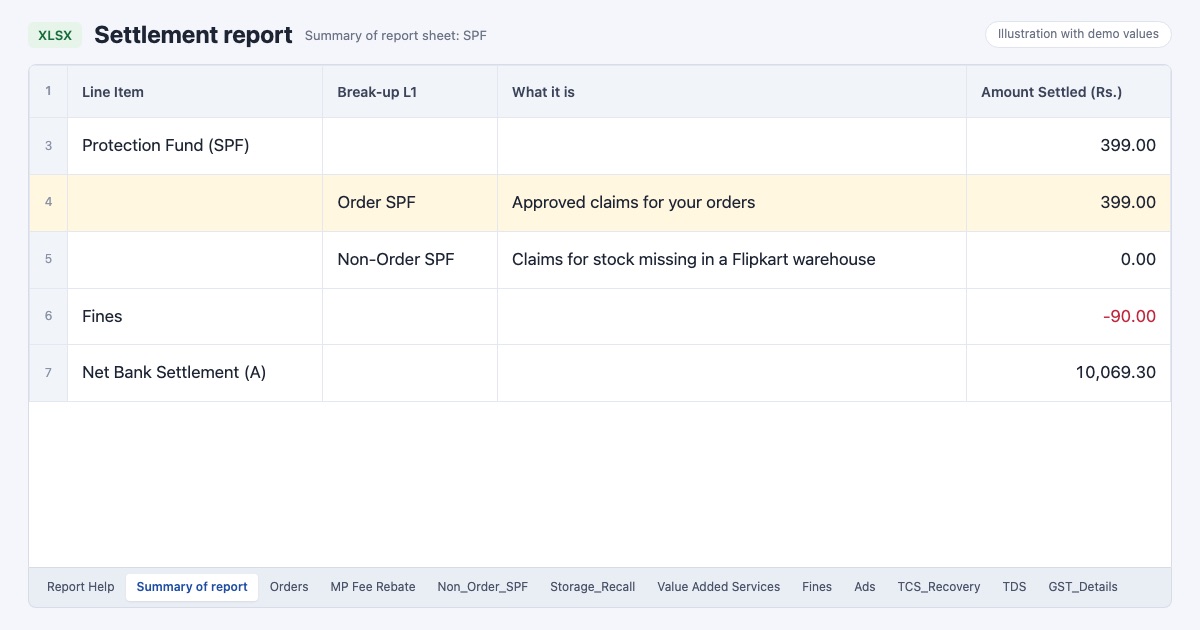
Approved claims come through the settlement report. The Summary of report sheet has a Protection Fund (SPF) block with two lines. Order SPF is the approved amount for claims on your orders, raised by you or processed by Flipkart on its own. Non-Order SPF is for stock that went missing in a Flipkart warehouse. In the Orders sheet, the Protection Fund column shows the amount on the order item's row.
Match the paid amount with your claim. In our September to October settlement, both SPF lines were ₹0 because we had not claimed; that is the cost of not keeping proof.
Keep returns and claims in one place
The free Flipkart seller dashboard lists every return from the returns report with its type, date and status, and shows what each returned order cost in the settlement. Use it to spot returns that came back but have no claim yet. For the cost side of returns, see the reverse shipping fee guide.
Frequently asked questions
What is SPF in Flipkart?
SPF is the Seller Protection Fund. Flipkart uses it to pay sellers for returns that come back damaged, used, incomplete or as a different product, after a claim is approved.
How many days do I have to claim SPF?
Flipkart's SPF FAQ says 14 days from receiving the returned product. Check the current limit in Seller Hub, because it can change.
Is an unboxing video needed for an SPF claim?
It is the strongest proof you can give. A continuous video from the sealed parcel to the product leaves little room for doubt.
Where do I see SPF money?
In the settlement report: the Order SPF line in the Summary of report sheet and the Protection Fund column in the Orders sheet.