Flipkart seller guide
How to Work Out Profit on a Flipkart Order After Fees, Returns and Ads
Quick answerStart from what Flipkart actually paid, not from the selling price. For each order item, add the Bank Settlement Value of all its rows in the settlement report. That already has Flipkart's fees, offers and taxes taken out. Then subtract the product and packing cost, and spread two costs over every order sold: the loss from customer returns (reverse shipping plus GST) and your ads spend. TCS and TDS in the payout are tax credits, so ask your accountant whether to add them back.
On this page · 6 sections
The formula
Profit per order item = payout from Flipkart − product cost − packing cost − share of return losses − share of ads spend.
The payout is the sum of Bank Settlement Value for the Order item ID across all its rows. Flipkart's fees, the offer amounts and TCS and TDS are already inside it, so do not subtract commission or shipping a second time.
A worked example
An illustration with demo numbers: a key holder sells for ₹249. In the settlement it has two rows, a sale row of ₹186.37 after fees and taxes, and an offer row of ₹25.00.
- Now the returns. If 1 in 13 orders of this product comes back as a customer return at ₹164.02 each, that is about ₹12.62 per order sold.
- Then the ads. If you spent ₹385 on ads for this product and sold 13, that is about ₹29.62 per order.
- Profit per order sold is then roughly ₹112.37 − ₹12.62 − ₹29.62 = ₹70.13.
| Line | Amount |
|---|---|
| Payout from Flipkart (₹186.37 + ₹25.00) | ₹211.37 |
| Product cost | −₹87.00 |
| Packing | −₹12.00 |
| Profit on this delivered order, before returns and ads | ₹112.37 |
Costs people miss
- Return losses. A customer return costs the reverse shipping fee plus 18% GST even though the sale and refund cancel out. On low-priced products one return can take the profit of several sales; see the reverse shipping fee guide.
- RTO packing. Our RTO rows had no fee, but the packing and the label were used.
- Ads. Flipkart takes ad money from the ads wallet, so it is not in the settlement report. Use the ads campaign report.
- Fines. They are on their own sheet and do not name the order. Count them for the month, not per order.
- Offers you fund. My share in the settlement is the part of an offer you pay; it is already in the payout.
Do the same per product
Profit per product (SKU) shows which listings carry the store and which lose money. Group the order items by Seller SKU, add their payouts, and subtract cost, return losses and ads for that SKU. Check that the SKU is spelled the same in every report first: Flipkart writes it differently in the Orders, Returns and settlement files.
Let the dashboard add it up
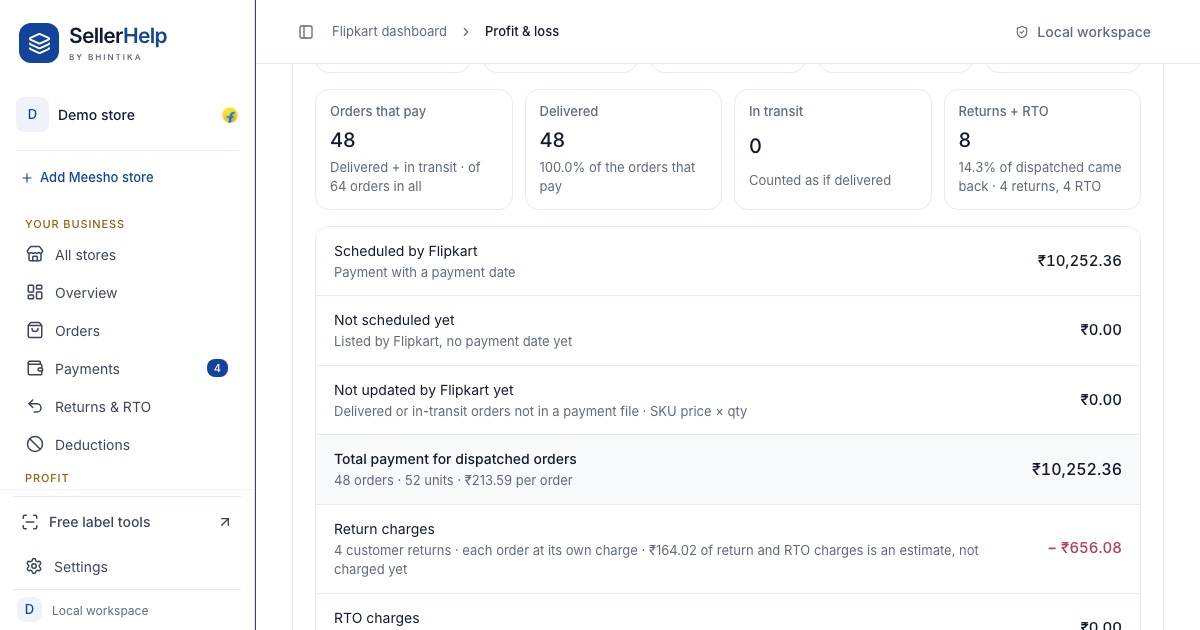
The free Flipkart seller dashboard does this for the whole store and for each SKU. Type each product's making and packing cost once, upload the settlement, orders, returns and ads reports, and the Profit & loss tab shows what you received, what is still to come and the net profit after returns, RTO and ads.
Frequently asked questions
Should I calculate Flipkart profit from the selling price?
No. Start from the payout in the settlement report, which already has fees, offers and taxes taken out. Starting from the price makes it easy to miss or double count a fee.
Are TCS and TDS a cost?
They are taken from the payout but can be claimed back as tax credits. Many sellers add them back for profit. Ask your accountant how to treat them.
How do I include returns in profit per order?
Add up what customer returns cost you in a period and divide by the orders sold in that period. Add that amount to the cost of every order.
Where do I find Flipkart ads cost?
In the ads campaign report from Advertising, Reports. Ads are paid from the ads wallet, so they are not in the settlement Orders sheet.