Flipkart seller guide
Offer Amount and My Share in the Flipkart Settlement, Explained
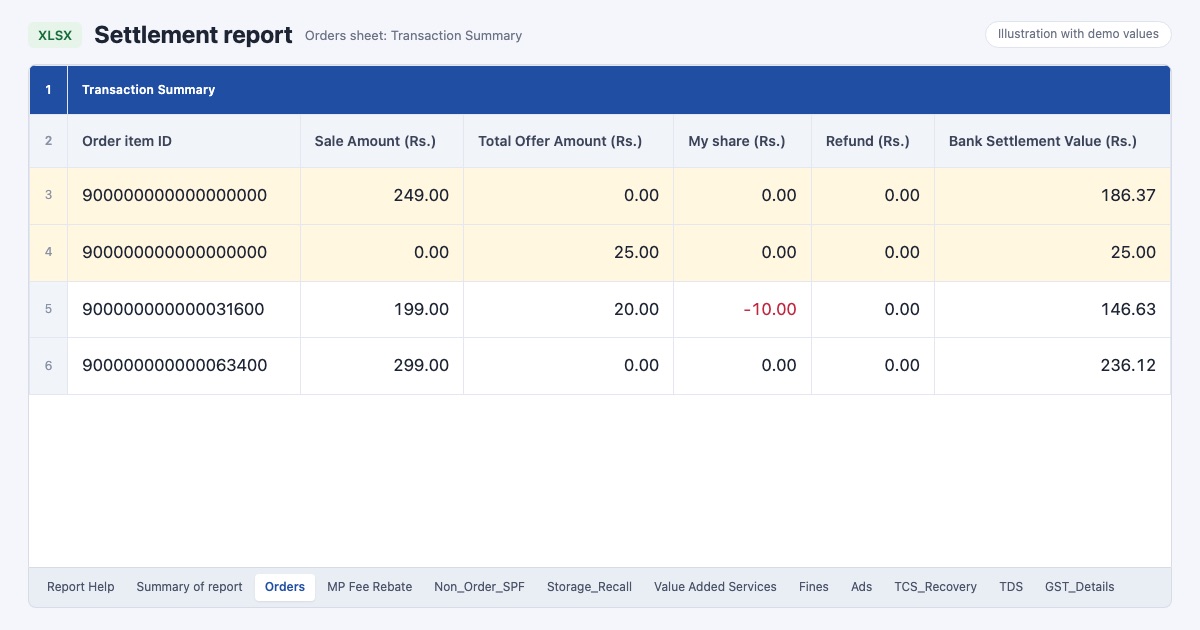
Quick answerSale Amount in the Flipkart settlement report is what the customer paid. Total Offer Amount is the discount on the sale, which is added to your payout. My share is the part of that discount you fund, shown as a minus. So the offer adds Total Offer Amount plus My share to your payout. In our month offers totalled ₹3,659, of which we funded ₹933.93, so offers added ₹2,725.07. The offer can sit on the sale row or on a row of its own for the same order item.
On this page · 6 sections
What the three columns mean
These meanings come from the notes Flipkart puts next to each line of the Summary of report sheet. Offer Amount in the Summary is Total Offer plus My Share, and it already includes offers reversed on returns.
| Column | What it is | Sign |
|---|---|---|
| Sale Amount (Rs.) | What the customer paid, including any shipping fee they paid | Plus |
| Total Offer Amount (Rs.) | The discount given to the customer on this item | Plus, minus when reversed after a return |
| My share (Rs.) | The part of the discount you fund | Minus |
Two real rows
A pooja thali set from our settlement: Sale Amount ₹271 and Total Offer Amount ₹13 on the same row, My share ₹0. After ₹1.44 of TCS and TDS, the row paid ₹282.56. The customer paid ₹271, and Flipkart added the ₹13 discount it funded.
A desk organiser had its ₹9 offer on a row of its own, next to the ₹66 sale row. When the customer returned it, a third row took the ₹9 back. That is why one order item can have several rows.
What offers cost us in one month
- Flipkart funded about three quarters of the discounts on our orders, and we funded about a quarter.
- My share is a real cost of the sale even though it never shows as a fee. Count it when you work out profit per order.
- Read Total Offer Amount together with My share. Looking at only one of them makes an offer look free or makes it look like a loss.
| Summary line | Amount |
|---|---|
| Total Offer | ₹3,659.00 |
| My Share (offers we funded) | −₹933.93 |
| Offer Amount added to the payout | ₹2,725.07 |
Check an offer before you join it
Before you opt a product into an offer in Seller Hub, note how much of the discount you fund.
After the first payouts, filter the settlement Orders sheet for that SKU and add My share. Compare it with the extra orders the offer brought.
Remember that a customer return reverses the offer too, so judge the offer on orders that were kept.
See offers inside each order
The free Flipkart seller dashboard adds every row of an order item, including separate offer rows, so the payment you see per order already includes the offer and your share. The profit per order guide shows how that payout turns into profit.
Frequently asked questions
What does My share mean in the Flipkart settlement report?
It is the part of the offer discount that you fund as the seller. It shows as a minus and lowers your payout.
Is Total Offer Amount money Flipkart gives me?
It is the discount on the sale, added to your payout. Your own share of it is then taken out under My share, so the net effect is Total Offer Amount plus My share.
Why is the offer on a separate row?
Flipkart sometimes settles the offer as its own row for the same Order item ID. Add all rows for the item to see the full payment.
What happens to the offer when the customer returns the item?
A row with a minus Total Offer Amount reverses it, so the offer nets to zero on a returned item.