Flipkart seller guide
Flipkart TCS and TDS: Where They Show and How to Claim Them Back
Quick answerFlipkart takes two small taxes from every sale before it pays you: TCS under GST, 0.5% of the sale value before GST, and TDS under income tax section 194-O, 0.1%. Both show in the TCS and TDS columns of the settlement report. They are not costs: TCS appears on the GST portal for you to use as credit, and TDS appears in Form 26AS and AIS for you to claim when you file your income tax return. In our month TCS was ₹234.52 and TDS ₹46.98.
On this page · 6 sections
How much is taken
We checked the rates on our own rows. On a ₹54 sale, the value before 18% GST is ₹45.76; 0.5% of that is ₹0.229 and 0.1% is ₹0.046, which is exactly what the TCS and TDS columns showed. On a return, the same amounts are given back on the return row.
| Tax | Law | Rate we saw | On a ₹54 sale (18% GST) |
|---|---|---|---|
| TCS | GST (collected by the marketplace) | 0.5% of the value before GST | ₹0.23 |
| TDS | Income tax, section 194-O | 0.1% of the value before GST | ₹0.05 |
Where they show in the settlement report
For our month the Summary showed TCS of ₹234.52 and TDS of ₹46.98. Flipkart's own note beside the TCS line says it is eligible for input tax credit when you file GSTR, and beside the TDS line that it is eligible for reimbursement when you file your income tax return.
- Orders sheet, Taxes group: TCS (Rs.) and TDS (Rs.) on each row, as minus amounts.
- Orders sheet, Payment Details: Input GST + TCS Credits and Income Tax Credits (TDS) for the row.
- Summary of report: TCS and TDS lines under Taxes, and Input GST + TCS Credits (B) at the end.
- TDS sheet: TDS claims that Flipkart has settled to you. TCS_Recovery sheet: TCS recovered for an earlier month.
Claiming TCS back
Flipkart files a monthly TCS return under GST. After that, the TCS collected on your sales shows on the GST portal against your GSTIN.
Accept the TCS entries on the portal and they reach your electronic cash ledger.
Use that balance to pay your GST, or claim a refund if it builds up.
Match the portal total with the TCS column of your settlement reports for the same months.
Claiming TDS back
Flipkart files a quarterly TDS return. The TDS then shows in your Form 26AS and AIS on the income tax portal.
Match it with the TDS column of your settlement reports for the year.
Claim it as tax already paid when you file your income tax return. If it is more than your tax, it comes back as a refund.
Do not count them as costs
TCS and TDS lower each payout, so they look like fees. They are your tax paid in advance. When you work out profit per order, ask your accountant whether to add them back.
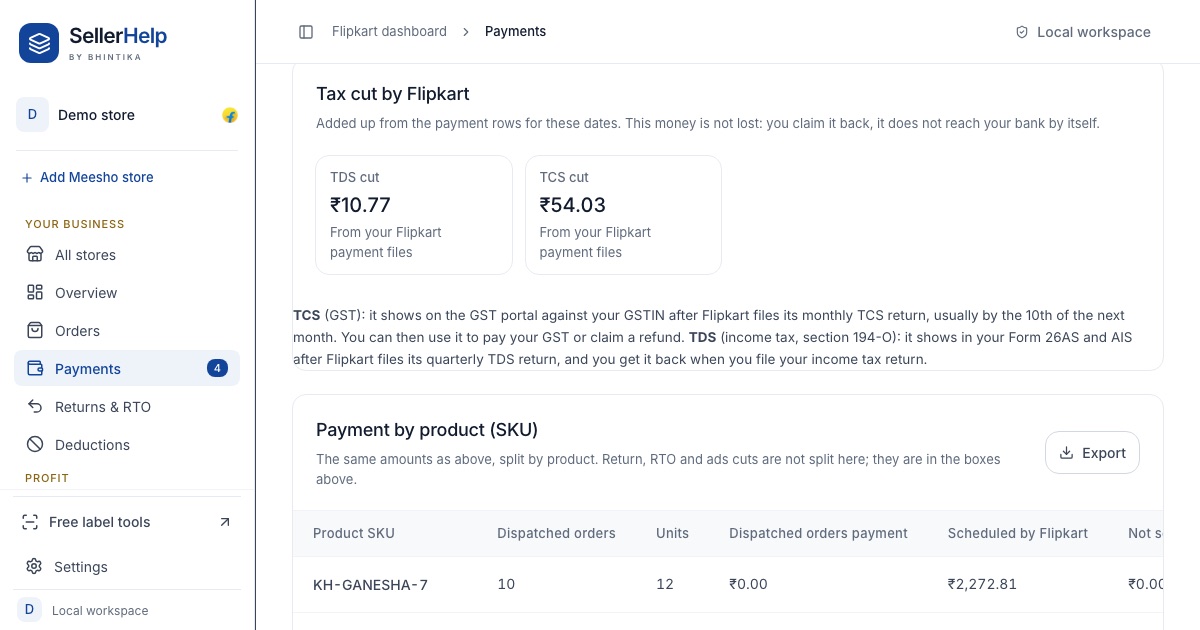
The free Flipkart seller dashboard adds up the TCS and TDS from your settlement reports for any dates you pick, in a Tax cut by Flipkart box on the Payments and Profit & loss tabs, so you have the totals ready to match with the GST and income tax portals.
Frequently asked questions
What is TCS in the Flipkart settlement report?
Tax collected at source under GST: 0.5% of the sale value before GST in our rows. You can use it as GST credit once Flipkart files its TCS return.
What is TDS in the Flipkart settlement report?
Tax deducted at source under income tax section 194-O: 0.1% of the sale value before GST in our rows. It shows in Form 26AS and AIS, and you claim it in your income tax return.
Do I get TCS and TDS back on returned orders?
Yes. On a return row in our settlement, the TCS and TDS taken on the sale were given back.
Should I ask Flipkart to refund TDS?
For section 194-O TDS, Flipkart's note says it is eligible for reimbursement during income tax filing. The TDS sheet lists any TDS claims Flipkart settles; ask your accountant which applies to you.