Seller guide
Thermal 4x6 Versus 3x5 and 4x4 Labels: Which Size Speeds Up Your Daily Packing?
Quick answerFor most Meesho, Flipkart and Amazon sellers, 4x6 inch thermal labels are the fastest choice. The marketplace label fills a 4x6 label best, so the barcode and address print largest and scan first time. 3x5 and 4x4 labels use less material, but the same label prints smaller: about 75% of its 4x6 size on 3x5 and about 67% on 4x4. Pick a smaller size only if your parcels are small and a test label scans cleanly.
On this page · 7 sections
The three sizes in inches and millimetres
Rolls sold as 100 x 150 mm are close to 4x6 but not exactly the same. The label size guide explains when that difference matters.
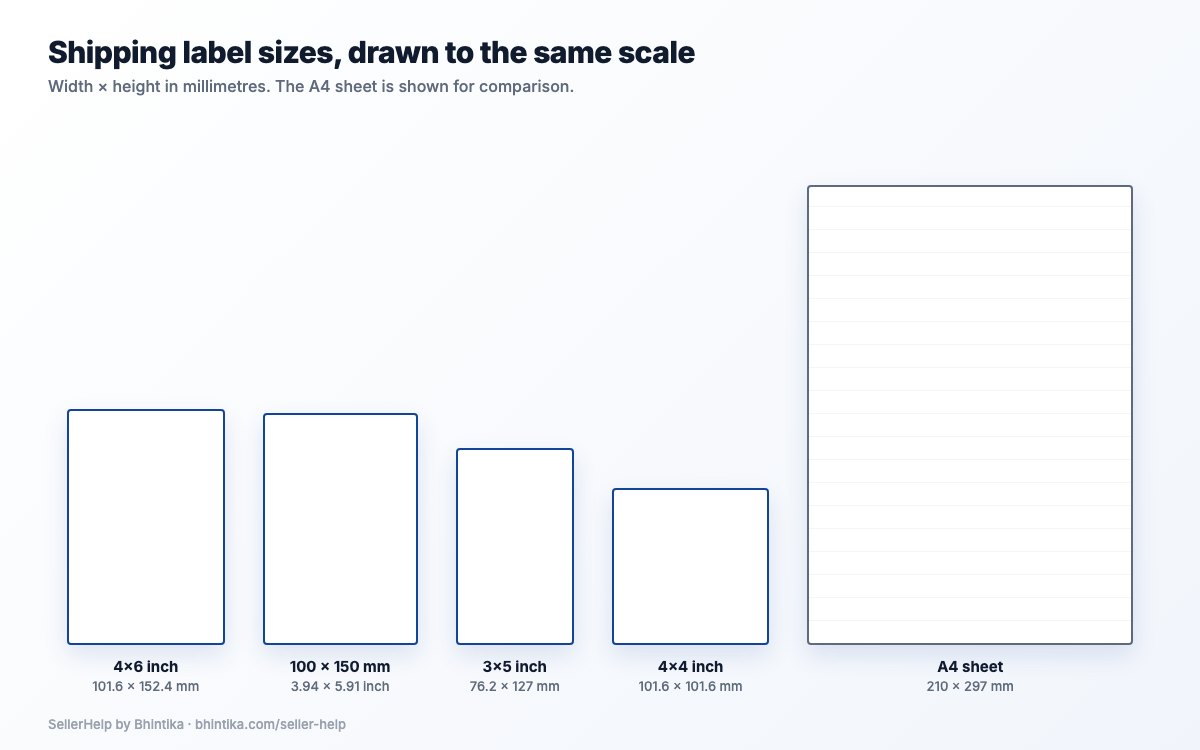
| Label | Size in mm | Shape |
|---|---|---|
| 4x6 inch | 101.6 x 152.4 | Tall rectangle, the usual shipping label roll |
| 3x5 inch | 76.2 x 127 | Narrower and shorter rectangle |
| 4x4 inch | 101.6 x 101.6 | Square, same width as 4x6 |
What happens to a marketplace label on smaller paper
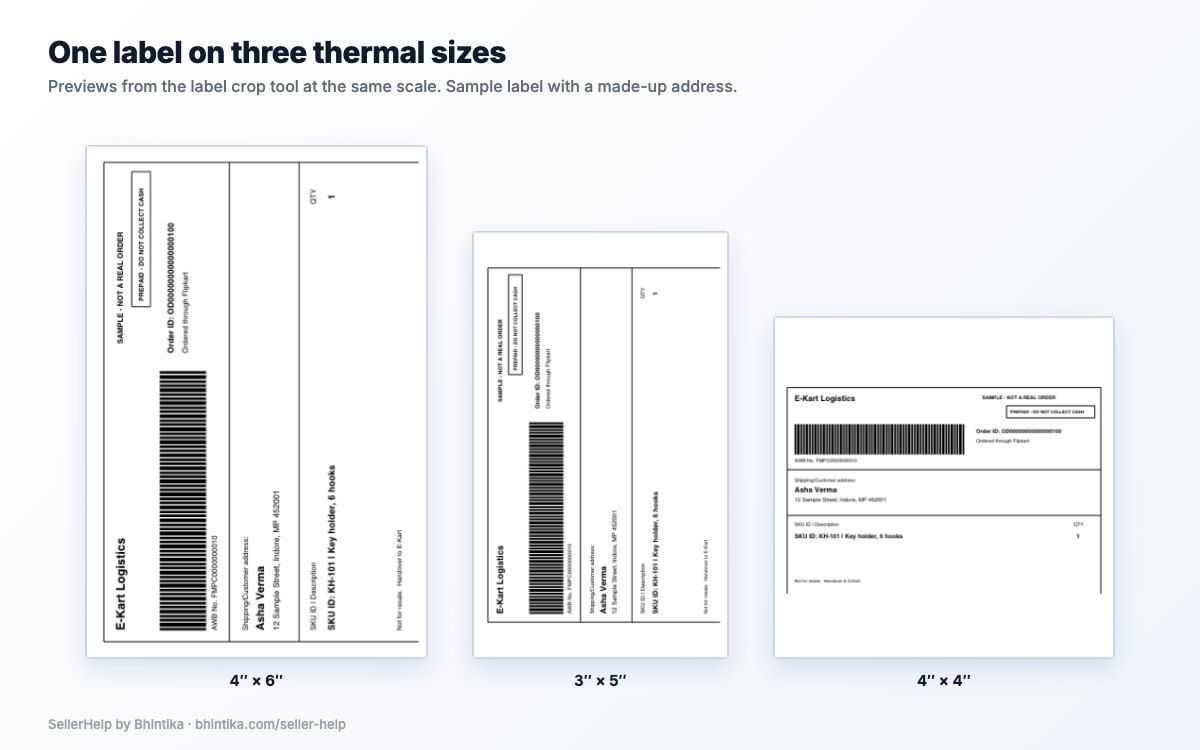
Meesho, Flipkart and Amazon give you a label PDF, and the label part of each page has a fixed shape. When the Seller Help label crop tool prepares it for your paper, it keeps that shape and fits the label as large as the paper allows. It turns the label 90 degrees only when that makes it clearly larger.
So nothing is cut off on 3x5 or 4x4, but everything gets smaller: the address, the order ID, the SKU and the barcode bars. A label shaped like a 4x6 label prints at about 75% of its 4x6 size on 3x5 paper, where the 3-inch width limits it, and at about 67% on 4x4 paper, where the 4-inch height limits it and leaves blank space at the sides.
- Your marketplace label may not have exactly the 4x6 shape, so look at the preview in the tool to see the real size.
- A smaller barcode is harder for a courier scanner to read, especially on a worn print head or cheap paper. Always scan a test label with your phone before you print a batch.
| Paper | Label prints at (vs 4x6) | What limits it |
|---|---|---|
| 4x6 | 100% | Fills the label |
| 3x5 | About 75% | Width: 3 inches instead of 4 |
| 4x4 | About 67% | Height: 4 inches instead of 6, so blank space is left at the sides |
Which size is faster at the packing table
Packing speed depends less on the label size than on how often something goes wrong: a label that does not scan, a reprint, a label that does not fit the parcel, or a roll change in the middle of a batch.
| Size | Faster when | Slows you down when |
|---|---|---|
| 4x6 | You ship mixed parcel sizes and want every barcode to scan the first time | Your parcels are pouches too small for a 6-inch label |
| 3x5 | Most parcels are small pouches and a test label scans cleanly | The smaller print needs reprints, or your printer needs its guides changed for a narrower roll |
| 4x4 | Your boxes have a square top and a test label scans cleanly | The label leaves wide blank sides and the text is small enough to cause misreads |
Check your thermal printer before you change size
The full driver and calibration steps are in the 4x6 thermal printer setup guide. Still choosing a printer? See how to choose a 4x6 thermal label printer.
- A thermal 4x6 label printer has a 4-inch print width, so it can also print 4x4 labels. A 3x5 roll is narrower: set the roll guides to the new width and calibrate so the printer finds the gap between labels.
- Create a paper size in the printer driver that matches the new roll exactly. With a 4x6 driver setting on a 4x4 roll, the print runs past the gap onto the next label.
- Keep one size per batch. Changing rolls halfway through a day of orders costs more time than either size saves.
Print any of the three sizes with the label crop tool
The PDFs are read in your browser and not uploaded, and you do not need an account or a marketplace login.
Download the label PDF from your Meesho Supplier Panel, Flipkart Seller Hub or Amazon Seller Central, and keep the original file.
Open the label crop tool, select "+ Add PDF files" and use "Upload & Prepare Labels". You can add several PDFs in one batch.
Keep "Crop labels" selected, then choose 4x6, 3x5 or 4x4 under Output Paper Size. The tool remembers the size you chose, so it is already selected the next time you open it on the same browser.
Choose Sort Type: SKU to pack one product at a time, or Courier Partner to stack parcels by pickup agent. See sorting labels by SKU for when each helps.
Check the preview at your size, select "Generate Sorted PDF", print one label at 100% (Actual size) with "Fit to page" off, scan it, then print the batch.
How to decide in ten minutes
Take one day of label PDFs and prepare them once at 4x6 and once at your smaller size.
Print three labels of each and scan every barcode with your phone.
Stick them on your most common parcel sizes and check that the label lies flat and the address is easy to read at arm's length.
If the smaller size scans every time and fits your parcels better, switch for a week and note any courier scan problems. If not, stay on 4x6.
Frequently asked questions
Which is better for shipping labels, 4x6 or 4x4?
For most marketplace sellers 4x6 is better: the label prints at full size and the barcode is largest. A label shaped like 4x6 prints at about two thirds of that size on 4x4, so use 4x4 only if a test label scans cleanly and your boxes suit it.
Can I print Meesho or Flipkart labels on 3x5 labels?
Yes. Choose 3x5 as the Output Paper Size in the label crop tool. The label is fitted to the paper and prints at about three quarters of its 4x6 size, so scan a test label first.
Can a 4x6 thermal label printer print 3x5 or 4x4 labels?
Usually yes, as long as the roll fits the printer. Set the roll guides, create a matching paper size in the driver and calibrate the printer after loading the new roll.
Is 100 x 150 mm the same as 4x6?
Nearly. 4x6 inches is 101.6 x 152.4 mm. Set your PDF and printer driver to the size of the roll you actually loaded.
Does the label crop tool remember my label size?
Yes. The Output Paper Size you choose is saved in your browser and selected again the next time you open the tool there.