Seller guide
Best 4x6 Thermal Label Printers for Indian Marketplace Sellers on a Budget
Quick answerThe best 4x6 thermal label printer for a Meesho, Flipkart or Amazon seller is the one that prints a complete, scannable label from your computer or phone, takes the label rolls you can buy locally and can be repaired in your city. For most sellers that means a direct thermal printer at 203 dpi or higher, a USB connection plus Bluetooth if you print from a phone, a supported driver for your operating system and a seller who gives a GST invoice and real after-sales service. Check these points against the maker's own specification page before you pay, then print your first batch from a correctly sized 4x6 PDF.
On this page · 8 sections
How to pick the best 4x6 thermal label printer for your orders
Most "best printer" lists rank models by price or by a reviewer's choice. A seller's needs vary more than that. Someone packing 20 Meesho orders from home on an Android phone needs a different printer from a warehouse printing 800 Flipkart labels before the afternoon pickup.
This guide gives you the checks to compare any printer you are offered, in a shop, on a marketplace listing or from a distributor. It names no models and quotes no prices, because both change every few weeks. Read the specifications on the maker's own website, since marketplace listings sometimes copy them wrongly.
Seven things to check before you buy
- Print method. Shipping labels only need to last until delivery, so most sellers buy a direct thermal printer, which uses heat-sensitive labels and no ink or ribbon. Some listings say "thermal transfer" for printers that are direct thermal only, and the reverse. Check the maker's page.
- Print resolution (dpi). Desktop label printers are usually sold at 203 dpi, and some at 300 dpi. 203 dpi is enough for standard courier barcodes and addresses. 300 dpi helps with very small text or dense QR codes, and it costs more.
- Print speed. Makers give speed in mm per second or inches per second. The figure is the fastest the printhead moves, not how many labels you get in a minute, because your computer also has to send each page. A faster printer saves time once you print large batches every day.
- Connectivity. USB is the most reliable for a fixed packing table. Bluetooth or Wi-Fi lets you print from a phone, but only if the maker's app can print a PDF on that phone. Ethernet suits a shared printer in a warehouse.
- Roll and media size. Check the maximum label width (a 4x6 label needs at least 4 inches, or 101.6 mm, of print width), the largest roll the holder takes and the core size. A printer that only takes small rolls means more roll changes in the middle of a batch. Some models also take fan-fold stacks fed from behind.
- Driver and app support. Confirm a driver for your exact Windows or macOS version, and an Android or iOS app if you will print from a phone. A printer with no proper driver for your system may print the PDF at the wrong size.
- After-sales service in India. Ask where the nearest service centre is, how long the warranty is and whether it covers the printhead, which wears with use. Check that spare parts and labels are easy to buy, and ask for a GST invoice with your GSTIN if you claim input tax credit.
Budget, mid-range and business printers
Prices change too often to quote, but 4x6 printers fall into rough groups. Compare a printer with others in its own group, and pay more only for a feature you will use.
| Group | Usually suits | What to check closely |
|---|---|---|
| Entry-level 4x6 printers sold for e-commerce | Home sellers and small daily batches | Driver quality, real print width, service network and label roll size |
| Mid-range desktop printers from established label brands | Growing sellers who print every day | Speed, roll capacity, warranty and printhead cover |
| Business and industrial printers | Warehouses and very large daily batches | Ethernet, large rolls, duty rating and an on-site service plan |
Direct thermal or thermal transfer: longevity and cost per label
A direct thermal print can fade with heat, sunlight and time. For a shipping label that only has to survive a few days in transit, that is rarely a problem. Thermal transfer prints last much longer because a ribbon puts the image on the label, but you pay for the ribbon as well as the labels.
Work out your own cost per label before you choose. For direct thermal, divide the price of a roll by the number of labels on it. For thermal transfer, add the ribbon's price divided by the number of labels one ribbon prints. Use the prices your local supplier quotes you, and keep the same label size in both sums.
Inkjet and laser printers can also print labels on A4 sticker sheets. That works when you already own one and print a few orders a day; see how to print marketplace labels on A4 paper. For daily 4x6 batches, a thermal printer avoids ink or toner and cutting sheets by hand.
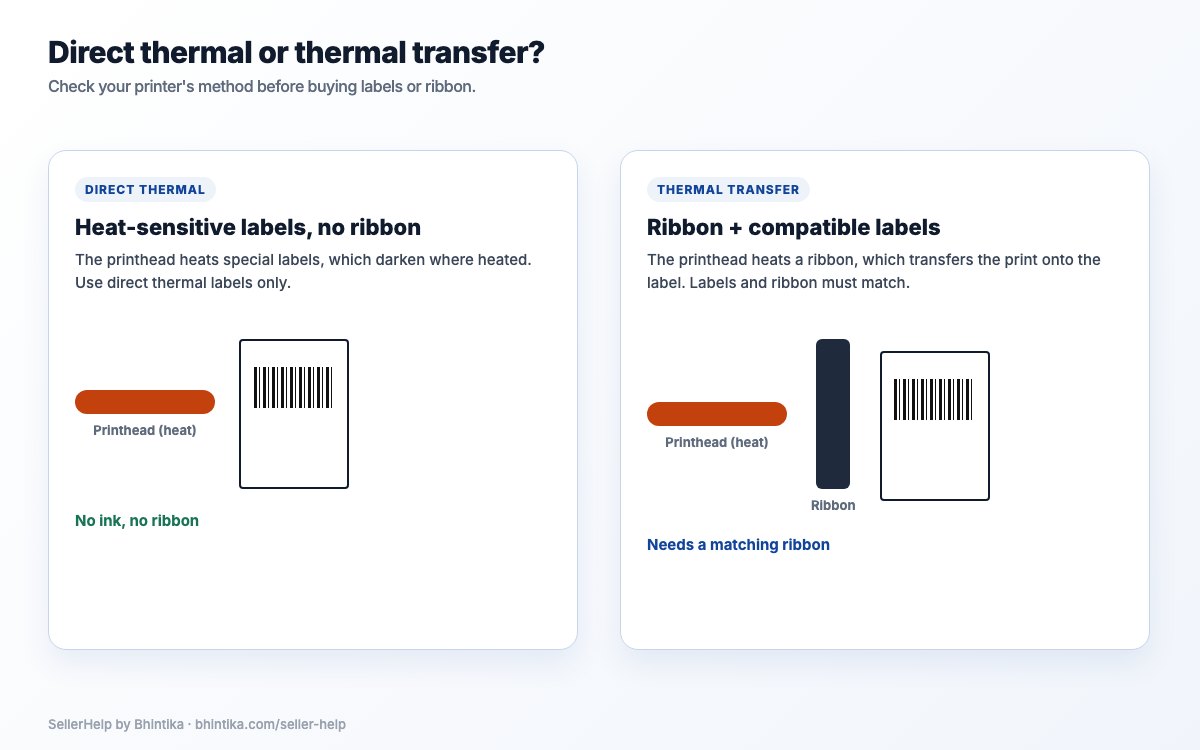
| Point | Direct thermal | Thermal transfer |
|---|---|---|
| Supplies | Heat-sensitive labels only | Compatible labels and a matching ribbon |
| How long the print lasts | Can fade with heat, light and time | Lasts longer |
| Cost per label | Label price | Label price plus ribbon share |
| Typical use | Shipping labels for parcels in transit | Labels that must stay readable for months, such as stock or asset labels |
Check the label size before you buy rolls
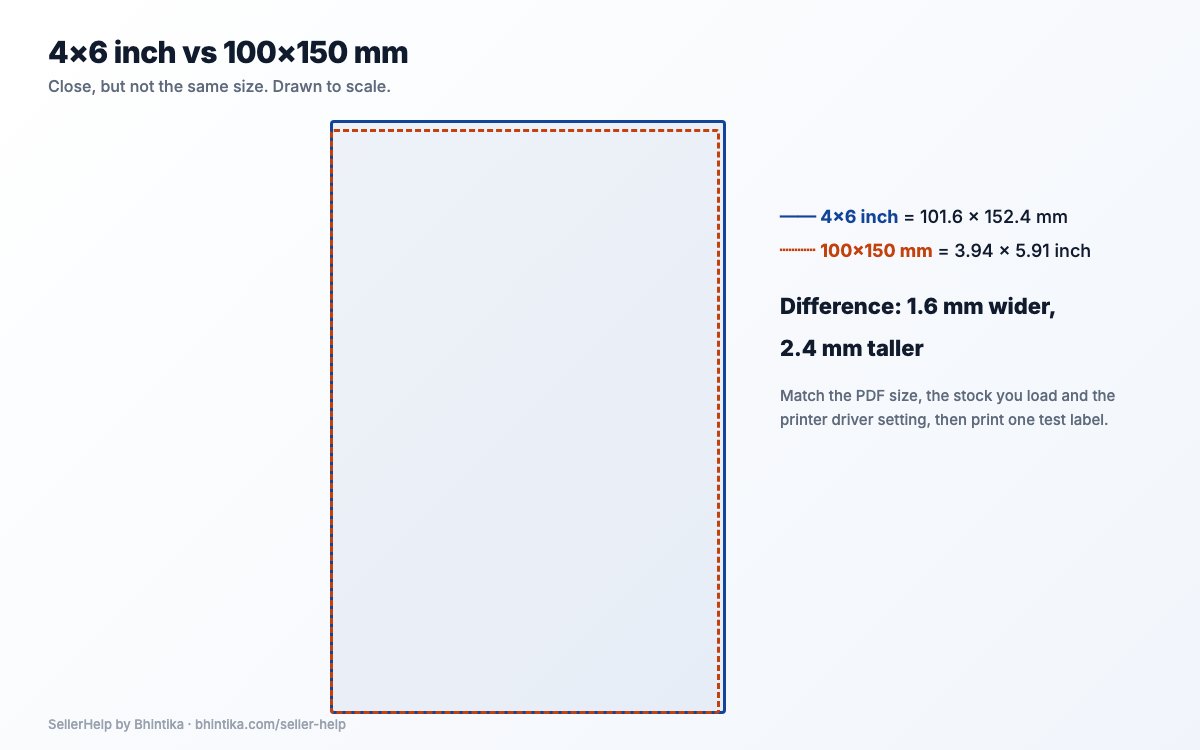
A 4x6 inch label is 101.6 x 152.4 mm. Many rolls sold in India are marked 100 x 150 mm, which is slightly smaller. Both work if your PDF and your printer profile use the same size as the roll you load. The label-size guide explains the difference and the print settings.
Packing-table checks when the printer arrives
Do these checks in the first days, while you can still return or replace the printer. Follow the maker's setup steps first; the thermal printer setup guide covers the driver, calibration and paper profile.
Alignment. Print one label, then ten in a row. The address, barcode and order ID should sit in the same place on the first and the tenth label. If the print slowly moves down the labels, recalibrate the media and check the paper size. The cut-off and shifted-label guide helps when it still drifts.
Barcode scan. Scan the barcode and any QR code on a test label with your phone. A phone scan is a first check; the courier's scanner decides in the end.
Peel and stick. Peel a label off the backing and stick it on the poly mailer or box you actually use. It should come off the backing cleanly and stay flat on the parcel.
Batch speed. Print a normal day's batch from one PDF and time it. If it pauses between labels, the cause is often a slow computer or a very large file as well as the printer.
Phone printing. If you bought the printer for Bluetooth, print a full marketplace PDF from your phone. The app's sample label proves less.
Get print-ready 4x6 PDFs for any printer
Meesho and Flipkart usually give labels with the tax invoice on the same page, and Amazon label PDFs may not match your roll. Sent straight to a 4x6 printer, those pages print shrunk or cut off, whatever printer you bought.
The free Seller Help label crop tool turns Meesho, Flipkart and Amazon label PDFs into 4x6, 3x5 or 4x4 inch thermal labels, or A4 with one or four labels per sheet. It can sort the labels by SKU or by courier partner. The PDF is processed inside your browser and is not uploaded, so customer addresses stay on your computer. Each file can be up to 100 MB and 1,000 pages.
Print the cropped PDF at Actual size or 100%, with the paper size set to the roll you loaded. The guides for Meesho, Flipkart and Amazon Easy Ship labels cover each marketplace's file.
Frequently asked questions
What is the best 4x6 thermal label printer for Meesho and Flipkart sellers?
The one that matches your volume: a direct thermal printer at 203 dpi or higher, with a driver for your computer, rolls you can buy locally and a service centre near you. Check the specifications on the maker's own page before you buy.
Which dpi do I need for shipping labels?
203 dpi is enough for standard courier barcodes and addresses. Choose 300 dpi if your labels carry very small text or dense QR codes.
Does a thermal label printer need ink?
A direct thermal printer uses heat-sensitive labels and needs no ink or ribbon. A thermal transfer printer needs a ribbon. Check the print method on the maker's specification page.
Can I print Meesho and Flipkart labels from my phone?
Only if the printer's app or driver can print a PDF from your phone. Bluetooth alone does not guarantee it. Test a full marketplace PDF before you rely on it.
Will any 4x6 thermal printer work with Meesho, Flipkart and Amazon?
The marketplace only gives you a PDF. Any printer that prints a 4x6 PDF at actual size can print it, once the label is cropped to 4x6 and the paper size matches your roll.
Is 100 x 150 mm the same as 4x6?
Nearly. 4x6 inches is 101.6 x 152.4 mm. Set your PDF and printer profile to the size of the roll you actually load.