Flipkart seller guide
Charged for the Wrong Weight on Flipkart? How to Check and Dispute It
Quick answerEvery shipping charge row in the Flipkart settlement report shows the weight Flipkart used: Dead Weight, the box size, Volumetric Weight (length × breadth × height ÷ 5000 in our file), whether the weight was system measured or seller provided, and the slab and zone. Compare those with your own packed weight and box size. If Flipkart's numbers are higher than your parcel, raise a dispute with Seller Support with a photo of the parcel on a scale and the box with a tape measure.
On this page · 6 sections
Find the weight Flipkart used
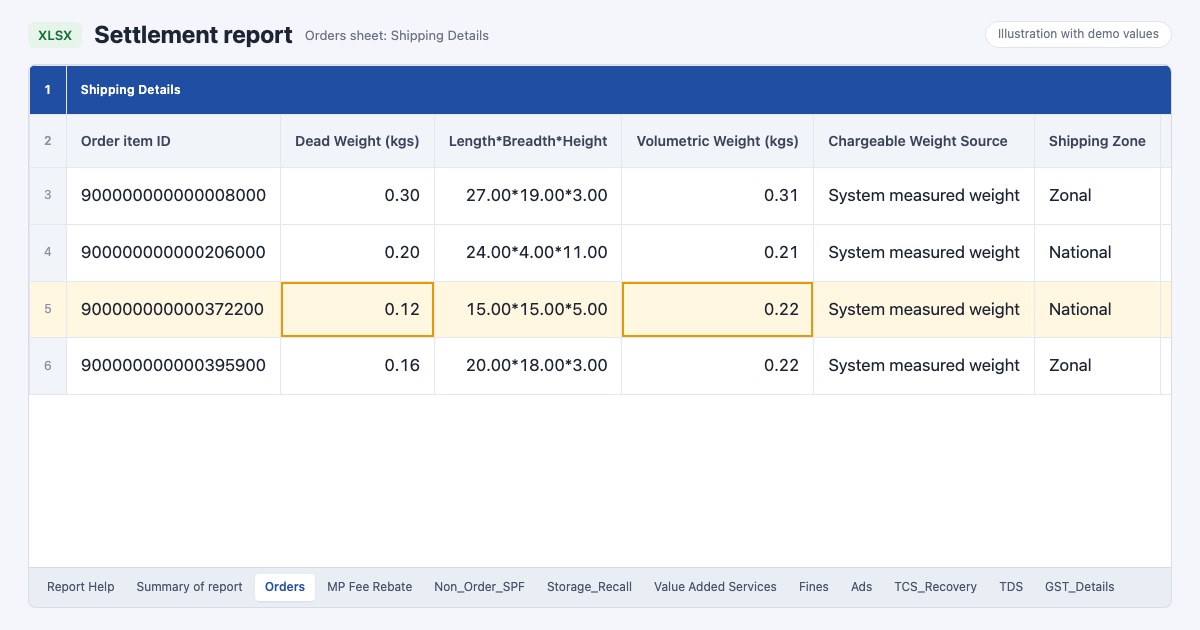
Open the Orders sheet of the settlement report and scroll to the Shipping Details group. On every row with a shipping charge you will see Dead Weight (kgs), Length*Breadth*Height, Volumetric Weight (kgs), Chargeable Weight Source, Chargeable Weight Type, Chargeable Wt. Slab (In Kgs) and Shipping Zone. The shipping fee guide explains each column.
In our month 52 of the 53 rows with weights said System measured weight, which means Flipkart's own measurement, not the weight from our listing.
Check one row
Work out the volumetric weight from the box size: length × breadth × height in cm ÷ 5000. It matched Flipkart's Volumetric Weight on every row of our file.
Compare Dead Weight with your packed parcel of that SKU on your own scale.
See which weight was used (Chargeable Weight Type) and which slab the fee was taken for.
If Flipkart's dead weight or box size is clearly bigger than your parcel, that row is worth a dispute.
Not every high fee is a weight error
A light item in a big box is charged on its volumetric weight. One of our parcels weighed 0.12 kg but its 15 × 15 × 5 cm box gave 0.22 kg. That is correct maths; the fix is a smaller box, not a dispute.
Zone changes the fee as well. In our file the same 15 × 15 × 5 box going National was charged ₹110 once and ₹175 on other returns, so compare a fee with Flipkart's current rate card for the zone and slab before you call it wrong.
Raise the dispute
Collect proof for the SKU: a photo of the packed parcel on a scale showing the weight, and photos of each side of the box with a tape measure.
List the Order item IDs, the weights and box sizes Flipkart recorded, and your own.
Raise it with Flipkart Seller Support from Seller Hub under the payments or shipping queries, with the photos and the list.
Check the next settlement reports for a reversal row, and note the ticket number with the orders.
Stop it happening again
The free Flipkart seller dashboard shows shipping and return charges per SKU, so a product charged more than its siblings stands out.
- Weigh and measure one packed parcel of every SKU and keep a photo. You will need it for any future dispute.
- Use the smallest box that protects the product.
- Keep the package weight and size in your listing the same as the packed parcel.
Frequently asked questions
How do I know which weight Flipkart charged?
Look at the Shipping Details columns of the settlement report: Dead Weight, Volumetric Weight, Chargeable Weight Type and Chargeable Wt. Slab on the row.
How is Flipkart volumetric weight calculated?
In our settlement file it was length × breadth × height in cm divided by 5000 on every row.
What proof do I need for a weight dispute?
A clear photo of the packed parcel on a scale and photos of the box with a tape measure, plus the Order item IDs and the weights Flipkart recorded.
Can I get the extra shipping charge back?
If Seller Support accepts the dispute, the difference should come back as a reversal in a later settlement. Keep checking the report for that order item.